7,896 search results (0.024 seconds)
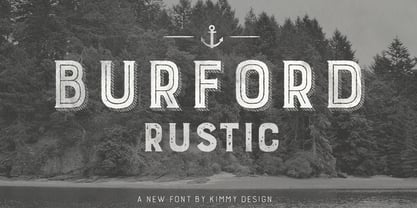
  1. Burford Rustic by Kimmy Design, $10.00
    Burford Rustic is the weathered and textured alternative to the Burford Family. It works the same way as Burford as a layer-based font family, but with some style variations and new layering options. It includes 20 font files, starting with four texture variations from Black, Bold, Light to Ultralight. It also includes and Outline and two Inline Weights. Additionally it offers three line weights (light, medium and bold) for top layering options. There are two extruded fonts and two drop shadow fonts, all either in a solo version and set with Burford Rustic Black for users not using Opentype programs. For users that have Opentype programs, such as Adobe Illustrator, Photoshop, InDesign, Microsoft Publisher and Quark, each font also comes with a set of Stylistic Alternatives for letters A C E F G H P Q R. There are two versions of each letter, and by using contextual alternatives, no two letters next to each other will be the same. Burford Rustic Basic package is created for users who don’t have access to programs with Opentype capabilities and are unable to use the layering effect. Burford Rustic can still be a powerful tool as each font can also be used on it’s own. It includes every font file not needed for the layering effect. The Burford Rustic Ornaments uses all basic keyboard characters - around 100 total elements per set. They are designed to go specifically with Burford Rustic and use the same textured edge. The set includes: banners, borders, corners, arrows, line breaks, catchwords, anchors and many more!
  2. MINECRAFT PE - Personal use only
  3. Ghost Reverie - Personal use only
  4. Rabanera - Personal use only
  5. BENS ALIENS - Personal use only
  6. KG Shadow of the Night - Personal use only
  7. VTC Embrace - Unknown license
  8. Blessings through Raindrops - Personal use only
  9. KRYPTOSCRIPTO - Personal use only
  10. VTC Tribal - 100% free
  11. VTC SubwaySlamSC - Unknown license
  12. VTC Krinkle-Kut - Unknown license
  13. VTC Krinkle-Kut - Unknown license
  14. VTC SubwaySlam - Unknown license
  15. VTC SeeJoBend - Unknown license
  16. VTC PunkettePumps - Unknown license
  17. VTC BadPaint - Unknown license
  18. VTC JoeleneHand - 100% free
  19. VTC JezzabelBimbo - Unknown license
  20. VTC VictorianLint - Unknown license
  21. VTC ScreamItLoudOutline - Unknown license
  22. VTC FunkinFrat - Unknown license
  23. VTC SeeJoBreak - Unknown license
  24. VTCBelialsBlade - Unknown license
  25. VTC Dizplaced - Unknown license
  26. VTC PizzOffWired - Unknown license
  27. VTC BadPaint - Unknown license
  28. VTC Optika - Unknown license
  29. VTC Anglika - Unknown license
  30. VTC Optika - Unknown license
  31. VTC AllWashedUp - Unknown license
  32. VTC Krinkle-Kut - Unknown license
  33. VTC PizzOff - Unknown license
  34. VTC OldAsCrap - Unknown license
  35. VTC StressedHand - Unknown license
  36. VTC PizzOff - Unknown license
  37. VTC AntiqueFizz - Unknown license
  38. VTC JoeleneHand - Unknown license
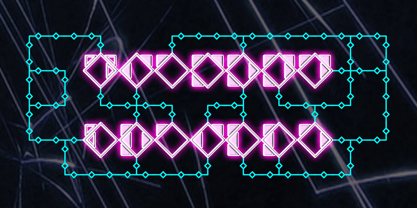
  39. Diamond Braille by Echopraxium, $5.00
    Here is a "Decorative Braille font". The initial design was indeed drawn on a K.I.S.S digital sketchpad, the Windows default drawing tool (Microsoft Paint, classic version). A. Glyph Concept The Braille 2x3 dot matrix is weaved around a diamond-shape. a.1. Each "dot" is represented by a "right-angle isocel triangle". a.2. Braille dots in Diamond Braille a.2.I. "Dots" are outside the diamond for first Braille row (Braille dots 1, 4) and third Braille row (Braille dots 3, 6). a.2.II. "Dots" are inside the diamond for second Braillle row (Braille dots 2, 5). a.3. Diamond lattice Glyphs are connected horizontally (to/bottom diamond's corners) and vertically (left/right corners) to each other (see poster 5). a.4. Special Glyphs - Space: its is either empty ("Empty cell") or a "non Braille shape" { _, ° } depending on your display needs (as explained in b.3.II) - 6 dots: { £, =, û } - 6 empty dots: { ç, ¥ } B. Font user guide b.1. Lowercase glyphs { A..Z } In these glyphs the "dots" are represented as a white right-angle isocel triangle filled with a smaller black triangle. b.2. Uppercase glyphs { a..z } In these glyphs, the "dots" are represented as an empty triangle (this is an "empty dot"). b.3. 'Space' vs 'Empty Cell' b.3.I. 'Space' - 'Space' glyph is an empty shape - '¶' glyph (at the end of each line in Microsoft Word) is also an empty shape b.3.II. 'Empty cell' glyphs: _ (underscore), ° (degree). In these glyphs there are 2 "empty dots" at top and bottom corners of the diamond, which differentiates them from regular Braille glyphs (which dont have a "dot in the middle"). b.4. Diamond Lattice To display text as a 'diamond lattice', replace each 'Space' by an 'Empty cell' (as explained in b.3.II, see poster 5) b.5. Connectors The connector glyphs allow the creation of "circuit like" designs (see poster 1). Here are the connector glyphs: { µ, à, â, ä, ã, è, é, ê, ë, î, ï } b.6. Domino feature Some Glyphs represent numbers 1..6 in a way which is similar than on dominos (see poster 6) C. Posters Poster 1: the "Font Logo", it displays "Diamond Braille" text together with the Connectors feature. Poster 2: a pangram which is published on pangra.me ( "Adept quick jog over frozen blue whisky mix" ). Poster 3: an illustration of the Domino feature. Poster 4: a DiamondBraille version of the Periodic table. Poster 5: illustration of the Diamond lattice using only 6 dots ( û ) and 6 empty dots ( ç ) glyphs.
  40. Confinental FREE - Personal use only
Looking for more fonts? Check out our New, Sans, Script, Handwriting fonts or Categories
abstract fontscontact usprivacy policyweb font generator
Processing