10,000 search results (0.033 seconds)
  1. FD Deer Deer - Personal use only
  2. the american flag - Unknown license
  3. Lady Starlight - Unknown license
  4. Turok - Unknown license
  5. RaveParty Oblique - Unknown license
  6. Eclipse - Unknown license
  7. Switzerland - Unknown license
  8. CODE3X - Unknown license
  9. abc - Personal use only
  10. Baumarkt - Unknown license
  11. Kalenderblatt Grotesk - Personal use only
  12. Circuitry - Unknown license
  13. Brassiere - Unknown license
  14. Tasmin Ref - Unknown license
  15. winob - Unknown license
  16. Blocked Off - Personal use only
  17. Jelek - 100% free
  18. GAU_font_modern - Unknown license
  19. Franken's-SteinA - 100% free
  20. Jumbo - 100% free
  21. Induction - Unknown license
  22. CARMEN - Unknown license
  23. Julie01 - Personal use only
  24. Quadaptor - Unknown license
  25. Moby - Unknown license
  26. Ben Brown - Unknown license
  27. Jailbox1 - Personal use only
  28. GUNBATS - Unknown license
  29. Alphabeta - Unknown license
  30. KG Beautiful Ending - Personal use only
  31. Big Blocko - Unknown license
  32. 11.20 - Unknown license
  33. Perolet - Unknown license
  34. Clearblock circular - Unknown license
  35. Dreamspeak - Unknown license
  36. Walkway Condensed SemiBold - Unknown license
  37. Axial Caps Med - Personal use only
  38. Octavus Caps Black - Personal use only

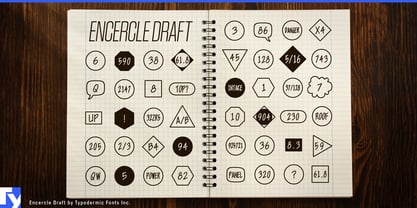
  39. Encercle Draft by Typodermic, $11.95
    With Encercle Draft, you can create circles and other shapes containing numbers up to 999999. Here's how it works: hold shift and type the number of digits, followed by a number. If you want the number 25, hold shift, type 2 followed by 25. If you want the number 250, hold shift, type 3 followed by 250. You can also type letters, periods, slashes, hyphens, question marks and exclamation points. Create an inverse white-on-black effect using your application's Bold feature. Easily change shapes by selecting a different font style from your application's font menu. Encercle Draft is available in the following shapes. Circle Square Box (wide rectangle) Box with rounded ends (tab) Diamond Circle inside a diamond Hexagon Hexagon rotated Octagon Triangle up Triangle down Triangle right Triangle left Quote bubble with left tail Quote bubble with right tail Quote bubble with no no tail Cloud (thought bubble) Encercle Draft uses OpenType technology. Most current graphic design applications support basic OpenType features but there are a few exceptions including AutoCAD, SketchUp, Solidworks and Canva. Encercle Draft will work in Affinity, Inkscape, GIMP, Adobe apps (not Photoshop Elements), Microsoft apps (not Powerpoint), Sibelius and more. Encercle Draft includes a PDF manual with examples. There's also an advanced feature which allows you to create solid-colored backgrounds. For a thicker, sans-serif style, check out Encercle Sans. For more complex layered effects with a different selection of typefaces and shapes, check out Numbers with Rings. Encercle PDF user manual.
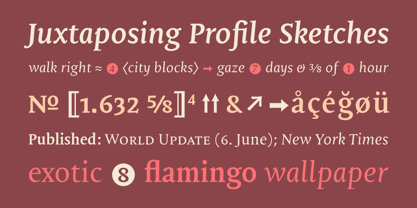
  40. Mantika Book by Linotype, $50.99
    Mantika Book was originally conceived and drawn parallel to the first Agilita drawings. *[images: pencil drawings] It took several years before having a chance looking at these designs again. But then, my first impulse was to turn this alphabet into a new sanserif, which was to become Mantika Sans. This was the starting point to conceive a super family consisting of different design styles and corresponding weights. The initial drawings of Mantika Book were refined and an Italic was developed to go with it. The aim was to create a modern serif typeface which is reminiscent of humanistic Renaissance typefaces, yet without following a particular historic model. Its large x-height for one is far away from original Renaissance models. Mantika Book was designed as a companion serif typeface to Mantika Sans that can be set for lengthy texts as in books, hence its name. It shares the same x-height with Mantika Sans but has longer ascenders and descenders, making for better word shapes in long, continuous reading. The approach of an ›old-style‹ looking typeface with large minuscules makes Mantika Book also a choice for magazine text settings where one often needs smaller point sizes to fit in a multiple columns layout. The unique details of Mantika Book are the asymetric bracketed serifs in the upright font and its higher stroke contrast than usual in a Renaissance style. The stems are slightly curved inwards. Also, the Italics have a low degree of inclination, which makes longer passages of text set in Italic rather pleasing to read. Another feature Mantika Book shares with Mantika Sans is that all four weights take up the same line length. It covers all European languages plus Cyrillic and Greek, is equipped with lots of useful scientific symbols [double square brackets, angle brackets, empty set, arrows] and the regular weight has small caps. There is a kind of an old-style feeling to Mantika Book, yet these citations were turned into a contemporary serif typeface with a soft but sturdy character.
Looking for more fonts? Check out our New, Sans, Script, Handwriting fonts or Categories
abstract fontscontact usprivacy policyweb font generator
Processing