10,000 search results (0.034 seconds)
  1. Gainsborough - Unknown license
  2. HURTMOLD_ - Personal use only
  3. KG Skinny Latte - Personal use only
  4. Perestroika - Unknown license
  5. Héloïse - Unknown license
  6. Nanosecond Thick BRK - Unknown license
  7. Rub This! - Unknown license
  8. ambulance shotgun - Unknown license
  9. LC Body - Unknown license
  10. Sfilth - Unknown license
  11. Sucaba - Unknown license
  12. Antelope H - Unknown license
  13. Kiloton - Unknown license
  14. SF Archery Black Outline - Unknown license
  15. Rosango - Unknown license
  16. Blue Highway D Type - Unknown license
  17. Xtreme Chrome - Unknown license
  18. SF Collegiate - Unknown license
  19. Synthetic BRK - 100% free
  20. Opulent - Unknown license
  21. twenty four - Unknown license
  22. Gilgongo Kaps - Unknown license
  23. stamPete - Unknown license
  24. ArtificeSSK - Unknown license
  25. ! Jamiroquai ! - Unknown license
  26. Chlorix - Unknown license
  27. pooplatter - Unknown license
  28. White Rabbit - Unknown license
  29. Fudd - Unknown license
  30. Lady Ice - Condensed - Unknown license
  31. Stoutface SC - Personal use only
  32. Kaput Black - Personal use only
  33. Tighten Caps Light - Personal use only
  34. Geoplace SC - Personal use only
  35. Kaput Black Black - Personal use only
  36. Octavus Black - Personal use only
  37. NeometraCaps Black - Personal use only
  38. Bullets by Wiescher Design, $6.00
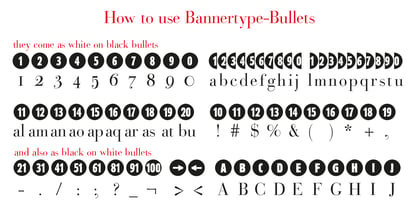
    BulletNumbers come in very handy for all kinds of lists that don't exceed 100 categories. I have long since been using my own Bullets in positive and negative and four styles, serif, sans, engravers and script, a fitting one for every occasion. Now I added six more designs and perfected the Bullets for all of you. The following is a »must read«! Here is how to use them: (Important! Set letterspacing to '0', otherwise the two digit numbers will have gaps!!!) The numbers 1-0 reside on the standard keys. Two digit numbers 01-99 can be composed out of left and right half circles by using (lowercase) 'abcdefghij' for the first digit (left half circle) and 'lmnopqrstu' for the second digit (right half circle). The critical pairs (all combinations with 1) can be found in various places. Type '!' for 10, '#' for 11, '$' 12, '%' for 13, '&' for 14, '(' for 15, ')' for 16, '*' for 17, '+' for 18, ',' for 19, '-' for 21, '.' for 31, '/' for 41, ':' for 51, ';' for 61, '?' for 81, '_' for 91. The two arrows are on the < and > keys. '100' can be found with shift+option+1. Last but not least, the capital letter bullets A-Z can be found on the shift+letter A-Z. Your very practical Gert Wiescher
  39. Bullet Numbers by Wiescher Design, $9.50
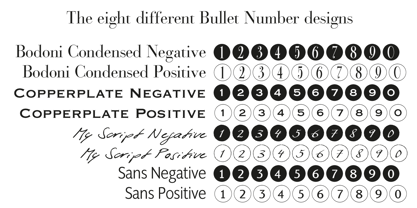
    This is a must read!!! BulletNumbers come in very handy for all kinds of lists that don't exceed 100 categories. I have long since been using my own BulletNumbers in positive and negative and four styles, serif, sans, engravers and script, a fitting one for every occasion. Now I perfected them for all of you. Here is how to use them: (Important! Set letterspacing to '0', otherwise the two digit numbers will overlap!!!) The numbers 1-0 reside on the standard keys. Two digit numbers 01-99 can be composed out of left and right half circles by using (lowercase) 'abcdefghij' for the first digit (left half circle) and 'lmnopqrstu' for the second digit (right half circle). The critical pairs (all combinations with 1) can be found in various places. Type '!' for 10, '#' for 11, '$' 12, '%' for 13, '&' for 14, '(' for 15, ')' for 16, '*' for 17, '+' for 18, ',' for 19, '-' for 21, '.' for 31, '/' for 41, ':' for 51, ';' for 61, '?' for 81, '_' for 91. The two arrows are on the < and > keys. '100' can be found with shift+option+1. Last but not least, the capital letter bullets A-Z can be found on the shift+letter A-Z. Yours very practical Gert Wiescher
  40. River City Sandwriting by River City, $24.98
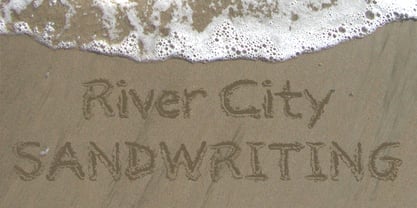
    I searched all over the internet looking for a realistic sand writing font and came away empty handed. Undaunted by this, I grabbed my business partner, Mary and trekked down to our local river, the Arkansas (pronounced ar-KAN-sas around here). Using sticks, we scratched out the entire alphabet in the sand, including upper & lowercase, and punctuation marks! I photographed the characters, converted them to line art on my computer and used font creating software to turn it into a true type font! This font was designed for adding dates, places and messages to your beach photos that looked as if you wrote it in the sand before you took the picture! It is a decorative font best used in large, headline sizes. To make it appear more realistic, select a darker color from the sand in the photo to use for the type instead of black!
Looking for more fonts? Check out our New, Sans, Script, Handwriting fonts or Categories
abstract fontscontact usprivacy policyweb font generator
Processing