10,000 search results (0.032 seconds)
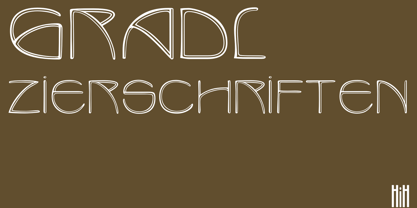
  1. Gradl Zierschriften by HiH, $10.00
    Here is another design by jewelry designer Max Joseph Gradl. Zier is a verb, meaning to decorate, adorn or ornament; zierlich means decorative, elegant, fine, neat. Schrift means type. Zierschrift, therefore, means decorative type. Gradl Zierschriften is a decorative type in the Art Nouveau style, rather than the more ornate Victorian style. Very modern, very young, with an elegant simplicity of form. Maria Makela, in her book The Munich Secession (Princeton 1990) suggests that the frequent use of simple, flowing, organic forms that was so characteristic of Art Nouveau was a reaction against the growing complexity and rapid urbanization that resulted from 19th century industrialization. In keeping with that reaction is the hand-drawn quality that intentionally rejects a mechanistic mathematic precision of line rendering. Gradl Zierschriften preserves that hand-drawn quality. Designed with upper case only, this face was obviously intended for short headlines only and is best set at 18 points or larger. However, I don't think you really get to experience the grace of this design until you get to 36 points or more. In the larger sizes, it is simply stunning. Please note that while most of the uppercase letterforms are repeated in the lower case for convenience, the ‘F’,‘L’ and ‘T’ are rendered a little narrower than in the uppercase to provide for visual variety. The font also includes a generous supply of ligatures for just the right fit ... and just for the fun of using them. Three common ways of inserting a ligature, accented letter or other special character are: 1) Key in “ALT”+“0”+[ascii #]; for example ALT+0233 for the e-acute, 2) From within your application program, go to the INSERT menu and look for something like “Insert Symbol,” (this function is NOT available in all application programs) & 3) Cut & Paste from the CHARACTER MAP display that has been supplied by every generation of Windows Operating System that I can recall (All Programs>Accessories>System Tools). Isn't it amazing what you can do? Don't be afraid to experiment. If you back up your work, you have very little to lose and a lot to gain. Not only do you acquire a new tool, but by the very process you have learned how to continually expand your knowledge and skill base.
  2. Pretendo - Personal use only
  3. Oliandre Demo - Personal use only
  4. Magnificent Serif - Personal use only
  5. Lemon Grass - Personal use only
  6. Walto Neue - Personal use only
  7. Declaration - 100% free
  8. tekken 6 2 - Unknown license
  9. Olympus Mount - Personal use only
  10. Guayaba Sans - personal use - Personal use only
  11. the haine au carre ! - Personal use only
  12. Relate - Personal use only
  13. Augustus Beveled - Personal use only
  14. Geoffrey - Personal use only
  15. Janda Flower Doodles - Personal use only
  16. Medyson - Personal use only
  17. Faltura Animals - Personal use only
  18. Cherry Blue - Personal use only
  19. Faltura Guerra - Personal use only
  20. Wankstaberg Battles - Personal use only
  21. CGM Locust Resistance - Unknown license
  22. Flyboy BB - Personal use only
  23. oakland hills 1991 - Personal use only
  24. Sanitarium BB - Personal use only
  25. London - Personal use only
  26. el&font gohtic! - Unknown license
  27. IRONGATE - Unknown license
  28. El&Font Tag! - Unknown license
  29. Yoghurt - Personal use only
  30. Eutemia I - Unknown license
  31. MAWNS Handwriting - Unknown license
  32. RagingRedLotus BB - Personal use only
  33. Spade - Unknown license
  34. ShockTherapy BB - Personal use only
  35. Rock Show Whiplash - Unknown license
  36. Faltura Alien - Personal use only
  37. CGF Arch Reactor - Unknown license
  38. the King & Queen font - Unknown license
  39. Clerica - Unknown license
Looking for more fonts? Check out our New, Sans, Script, Handwriting fonts or Categories
abstract fontscontact usprivacy policyweb font generator
Processing