10,000 search results (0.102 seconds)
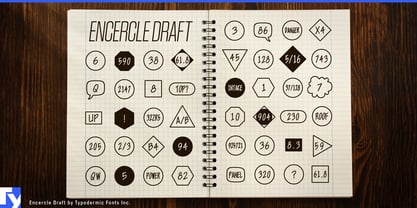
  1. Encercle Draft by Typodermic, $11.95
    With Encercle Draft, you can create circles and other shapes containing numbers up to 999999. Here's how it works: hold shift and type the number of digits, followed by a number. If you want the number 25, hold shift, type 2 followed by 25. If you want the number 250, hold shift, type 3 followed by 250. You can also type letters, periods, slashes, hyphens, question marks and exclamation points. Create an inverse white-on-black effect using your application's Bold feature. Easily change shapes by selecting a different font style from your application's font menu. Encercle Draft is available in the following shapes. Circle Square Box (wide rectangle) Box with rounded ends (tab) Diamond Circle inside a diamond Hexagon Hexagon rotated Octagon Triangle up Triangle down Triangle right Triangle left Quote bubble with left tail Quote bubble with right tail Quote bubble with no no tail Cloud (thought bubble) Encercle Draft uses OpenType technology. Most current graphic design applications support basic OpenType features but there are a few exceptions including AutoCAD, SketchUp, Solidworks and Canva. Encercle Draft will work in Affinity, Inkscape, GIMP, Adobe apps (not Photoshop Elements), Microsoft apps (not Powerpoint), Sibelius and more. Encercle Draft includes a PDF manual with examples. There's also an advanced feature which allows you to create solid-colored backgrounds. For a thicker, sans-serif style, check out Encercle Sans. For more complex layered effects with a different selection of typefaces and shapes, check out Numbers with Rings. Encercle PDF user manual.
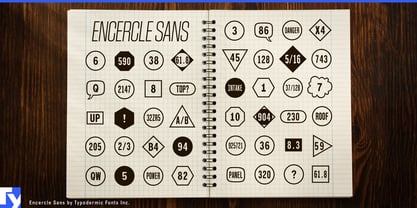
  2. Encercle Sans by Typodermic, $11.95
    With Encercle Sans, you can create circles and other shapes containing numbers up to 999999. Here's how it works: hold shift and type the number of digits, followed by a number. If you want the number 25, hold shift, type 2 followed by 25. If you want the number 250, hold shift, type 3 followed by 250. You can also type letters, periods, slashes, hyphens, question marks and exclamation points. Create an inverse white-on-black effect using your application's Bold feature. Easily change shapes by selecting a different font style from your application's font menu. Encercle Sans is available in the following shapes. Circle Square Box (wide rectangle) Box with rounded ends (tab) Diamond Circle inside a diamond Hexagon Hexagon rotated Octagon Triangle up Triangle down Triangle right Triangle left Quote bubble with left tail Quote bubble with right tail Quote bubble with no no tail Cloud (thought bubble) Encercle Sans uses OpenType technology. Most current graphic design applications support basic OpenType features but there are a few exceptions including AutoCAD, SketchUp, Solidworks and Canva. Encercle Sans will work in Affinity, Inkscape, GIMP, Adobe apps (not Photoshop Elements), Microsoft apps (not PowerPoint), Sibelius and more. Encercle Sans includes a PDF manual with examples. There's also an advanced feature which allows you to create solid-colored backgrounds. For a thinner, classic architecture/drafting style, check out Encercle Draft. For more complex layered effects with a different selection of typefaces and shapes, check out Numbers with Rings. Encercle PDF user manual.
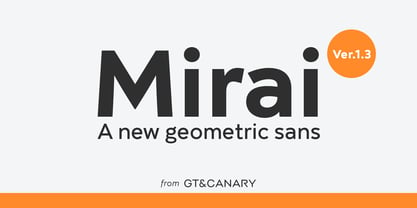
  3. Mirai by GT&CANARY, $34.00
    Mirai, a new geometric sans font family, is clean, strong and composed yet effortlessly contemporary. Mirai is a Japanese word meaning “the future”. While inspired by iconic fonts throughout history, Mirai has its own unique character with a Zen-like neutral tone. Mirai’s geometric shapes, mono-line and especially its high X-height make it legible and easily recognizable. The Mirai font family is comprised of 12 styles with 6 different weights from Thin to black, along with matching italics. Each weight has been specifically designed to contrast with other weights offering countless possibilities for use in web, print, package and sign design.
  4. Plasma Drip BRK - Unknown license
  5. Turmoil (BRK) - Unknown license
  6. Quarterly Thin BRK - 100% free
  7. Blox (BRK) - 100% free
  8. Qbicle 2 BRK - Unknown license
  9. Bandwidth Bandless BRK - Unknown license
  10. Circulate (BRK) - Unknown license
  11. Block Tilt BRK - Unknown license
  12. Qbicle 3 BRK - Unknown license
  13. Nanosecond Thick BRK - Unknown license
  14. Naughts (BRK) - Unknown license
  15. Nanosecond Thin BRK - Unknown license
  16. Line Dings BRK - 100% free
  17. Alpha Beta BRK - 100% free
  18. Bobcaygeon Plain BRK - Unknown license
  19. Obloquy Solid BRK - Unknown license
  20. Chintzy CPU BRK - Unknown license
  21. Wincing (BRK) - Unknown license
  22. Rotund Outline BRK - Unknown license
  23. Upheaval TT BRK - Unknown license
  24. Entangled (BRK) - Unknown license
  25. Quantum Round BRK - Unknown license
  26. Binary X BRK - Unknown license
  27. Nanosecond Wide BRK - Unknown license
  28. Crackdown O2 BRK - Unknown license
  29. Ataxia Outline BRK - Unknown license
  30. Cleaved TTR BRK - Unknown license
  31. Macropsia (BRK) - Unknown license
  32. Collective O BRK - Unknown license
  33. Powderworks (BRK) - 100% free
  34. genotype S BRK - Unknown license
  35. Simpleton (BRK) - Unknown license
  36. Qbicle 4 BRK - Unknown license
  37. Zoidal (BRK) - Unknown license
Looking for more fonts? Check out our New, Sans, Script, Handwriting fonts or Categories
abstract fontscontact usprivacy policyweb font generator
Processing